



TrueActive Monitor 5.0
TrueActive Monitor, true to its name, monitors all PC activities on a computer it's been installed on, including any programs running; keystrokes made; and files altered, created, deleted, moved, or renamed.

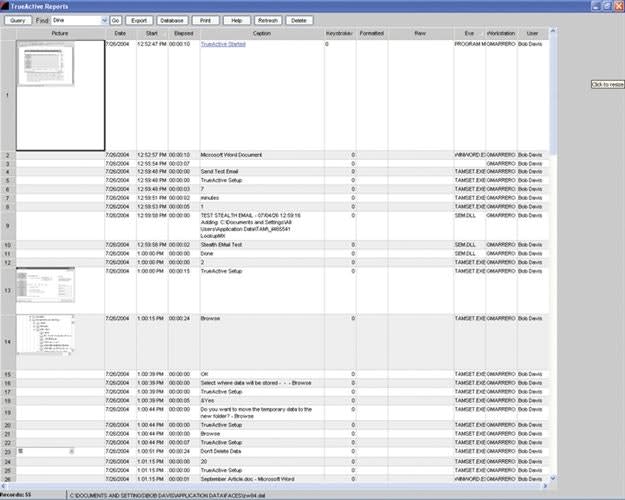
Last month I told you about forensic software that helps you find out how criminals have already used their computers. This month, let's look at a product from TrueActive Software that allows you to conduct live PC surveillance to find out how people are using their computers as they act. It's called TrueActive Monitor 5.0, or "TAM."
This Windows-based computer monitoring software used to be called WinWhatWhere Investigator. The company changed the name of the software (as well as the company name) to TrueActive due to some confusion. Name change or not, the software comes with a successful law enforcement track record over the past five years and, at about $100 for a license, it's affordable enough for most agencies.
TrueActive Monitor, true to its name, monitors all PC activities on a computer it's been installed on, including any programs running; keystrokes made; and files altered, created, deleted, moved, or renamed. In fact, its "live monitoring" will let you "see" screen captures by activating its customizable setup where you can set screen capture periods anywhere from once every second to once a day.
Another tool in TrueActive's setup bag of tricks is stealth e-mail. Want to be notified of an action or event that you want to watch happen? Just set the stealth e-mail to send a message indicating that activity to any valid e-mail recipient via the Web. The data can be sent whenever an Internet connection is made or on a timed basis. Just remember the obvious: the PC you're monitoring must have e-mail access first if TrueActive is going to secretly notify you.
Other options include administrative password protection, reporting modules, choice of a user-defined or pre-defined selection list of activities to monitor, Web page password capturing, and video capturing if a camera is attached to the computer.
Additionally, if the site you are monitoring is networked, TrueActive has a solution for you. Its "network manager" permits you to install, monitor, edit the setup, and start and stop monitoring remotely with a simple-to-understand user interface that indicates the status of each program installation as well as the PC's name and who is logged on to it.
So when you find yourself forced to work within a foreign I.T. department, you won't necessarily have to visit the PC you want to monitor. It can be handled remotely, if the appropriate directory services are in place, from anywhere within its network cloud. The significant benefit with this feature is the fewer people involved with your surveillance, the better.[PAGEBREAK]
Data collected by TAM can be stored wherever you feel is appropriate. If you want to use the local drive, go ahead. But remember, a curious user may discover files if you leave them there. A better solution in a networked environment would be to store files on the server where they can be protected from prying eyes using Windows' own security features. Or, you may also decide you don't need to store files at all. In that case, TAM's setup routines will allow you to automatically delete after a set period of time between one day and 30 months. It also allows you to determine an archiving period if one is appropriate for the work you are conducting.
Data collected from the monitored computer is stored in TAM's database in proprietary format. The reporting module has tools allowing compression, conversion, and searching of data with a simple point and click. You may also export items from the reporting screens into text files, html documents, and pictures. TAM also provides you the ability to print out copies of the data reports.
Recently, there has been more and more discussion about privacy in the work place. If you're using TAM to monitor employees' computer habits at work this can be a sticky subject.
In California, the legislature attempted to pass a law that would equate the use of a work computer with using a work telephone, on which employers may not monitor employees' conversations. I don't agree with the premise that they are the same. Although telephone technologies are evolving rapidly, they are not capable of the same functions as a PC. In the end, the governor at the time agreed and vetoed the bill. This is a complex issue and needs much discussion and thought before we establish a standard.
If you believe using this product is a violation of employees' privacy, you can program TrueActive Monitor to display a splash screen or banner page to the user and customize the message to fit the guidelines set by your agency. If nothing else, a disclaimer would certainly mitigate any claims of, "I didn't know I was being watched," or, "They violated my privacy rights." In either case, until a court of law decides the privacy implications of monitoring software, use common sense when using the tool and ask your local prosecuting attorney for his or her opinion on its admissibility.
TrueActive Monitor is a good solution and possibly a preemptive tool to the growing problem of computer misuse. It might offend some because of its "Big Brother" aspect, but it can certainly help you determine what you're dealing with. Whether it's a criminal situation or an employee who has way too much time on his or her hands, TrueActive Monitor is watching.
Bob Davis supervises the San Diego Police Department's computer lab. He has 26 years of experience on the force.
More Technology

A police agency's guide to data-driven fleet management
Costs are rising and the public expects more transparency into how their tax dollars are spent. This e-book shows how police agencies can use fleet data to take control of fleet expenses while improving officer safety and demonstrating fiscal responsibility to the communities they serve.
Read More →
AI and analytics for law enforcement: Turning data into insights
Law enforcement agencies are managing more video, sensor data and digital evidence than ever before. Discover how AI and analytics can help turn that data into actionable insights that strengthen situational awareness, accelerate investigations and support more informed decisions.
Read More →
Vasco Electronics Adds Automatic Language Detection to Vasco Translator Q1
Vasco Electronics’ software update introduces hands-free language switching and expanded offline translation across 45 language pairs, empowering law enforcement, healthcare, and front-office enterprise teams
Read More →

North Miami Police Department Deploys Mark43
The North Miami Police Department has deployed Mark43 as part of its Five-Year Strategic Plan that represents its collective vision and goals for a more proactive police department, anchored by a core commitment to leveraging modern technology to enhance efficiency and public safety.
Read More →
Cellebrite Genesis for Enterprise Now Generally Available
Made available to the public sector in June, Cellebrite Genesis is serving a growing mix of national, regional, and local agencies worldwide, including some of the largest regional and metropolitan police departments. It is now available for enterprise organizations.
Read More →
2026 Vision FirstNet Users Summit to Host Emerging Leaders Training on Grassroots Advocacy for Public Safety
“Emerging Leaders Training: Understanding the Importance of Grassroots Advocacy for Public Safety," a session during the 2026 Vision FirstNet Users Summit, will offer a roadmap for unified advocacy at the federal level.
Read More →
Motorola Solutions Completes Acquisition of D-Fend Solutions
Motorola Solutions has acquired D-Fend Solutions, an industry leader in counter-drone technology. This deal provides public safety and enterprise customers with access to advanced counter-unmanned aerial systems.
Read More →
ZeroEyes, Advantech & Camden Police Partner to Bring AI Gun Detection Technology to Delaware School District
ZeroEyes has partnered with Advantech and the Camden Police Department to deploy ZeroEyes’ AI gun detection and intelligent situational awareness platform at Delaware’s Caesar Rodney School District (CRSD).
Read More →
Leonardo U.S. Cyber & Security Solutions Introduces SignalTrace, the Next Evolution in Electronic Signature Detection Technology
SignalTrace reflects years of product refinement and a clearer expression of the technology’s purpose of recognizing and correlating electronic signatures in publicly broadcast wireless signals to reveal patterns, relationships, and trends that might otherwise go undetected.
Read More →
Pimloc Launches Secure File Sharing to Streamline Release of Redacted Video
Pimloc’s Secure File Sharing lets organizations deliver redacted video, audio, and documents through expiring, passcode-protected links, accelerating delivery while reducing security, compliance, and chain-of-custody risks.
Read More →