



Guidance Software EnCase 4.19
Since 1998 Pasadena, Calif.-based Guidance Software has been in the business of finding evidence where no man had gone before: the mass storage medium of computer systems.

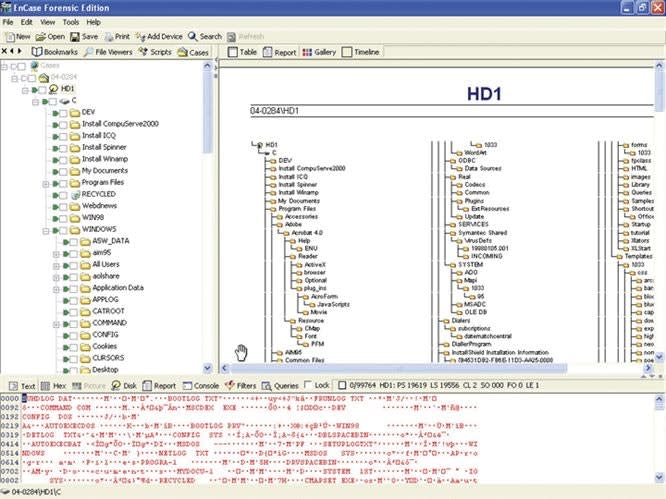
Computer forensics is not a passing fad. It's a growing field that is becoming more important to successfully solving a wide range of criminal cases as crooks' tech savvy progresses. In fact, an FBI report from 2002 indicates that 50 percent of all investigations require a forensic examination of at least one computer to produce the necessary evidence. And the numbers aren't likely to decrease.
Since 1998 Pasadena, Calif.-based Guidance Software has been in the business of finding evidence where no man had gone before: the mass storage medium of computer systems. Whether you're searching hard, floppy, or even USB drives, Guidance's EnCase Forensic Edition investigative tools are designed to find and preserve what you're looking for: computer files that the perps didn't want you to see.
The company's newest version, EnCase 4.19, is Windows-based software that accelerates and streamlines the process of searching a computer drive. Its virtual file system allows investigators to share the information collected with non-EnCase users while a familiar graphical user interface (GUI) allows you to create a noninvasive investigation image of the storage media. With EnCase you can also easily organize case information and generate standard and custom investigative reports.
By using the company's FastBloc write-blocker utility tools a trained investigator may even drill down into the very sectors and cylinders of a hard drive without altering any of the "original" data or its attributes.
EnCase 4.19 also includes many enhanced or altogether new features.
One of these new features, the text "find" command, is built much like the find command found in many word processors. When users requested this feature, the company actually listened and incorporated it into the new version. Other enhancements include improvements to reporting modules, navigation techniques, and the overall speed in which an investigative audit is processed.
Increasing its flexibility, EnCase now accommodates additional platforms. Not only can you use it on Windows and Macintosh systems, but also with PalmOS, Unix, and Linux, among others.
Also, an increased number of file systems are now supported by EnCase, including all FAT systems, NTFS, CDFS, UDF, BSD, Mac OS X, and RAID drives on servers.
All this flexibility is essential when working cases involving more sophisticated computer setups. Some suspects use several different systems to make it more complicated to track their files. To further help in finding and collecting pertinent files, Guidance has added to EnCase enhanced support for Outlook's PST files, Base64 and UUE encoded attachments, file structures for .tar and .gz files, and support for PNG-formatted graphics.
One of the most important changes to EnCase is an enhancement in NTFS folder recovery tools, critical for recovering data when a drive has been formatted to conceal or destroy incriminating evidence. This is also useful when a master file table has been corrupted. With a simple right click on a computer drive icon you can uncover hidden files in what appears to be a formatted drive containing no data. EnCase's tools can recover files and place them into a virtual "lost files" folder while simultaneously recreating the directory structure to make clear what you have found.
Another new tool gives you the ability to search in both compressed folders and files. Combine this with the "search" and "text view" tools in the display's lower pane and EnCase automatically reveals the contents of a file for inspection. With added support from the Microsoft Encrypted File System you'll also have access to domain-authenticated accounts, as well as a Windows-protected storage area where you can recover user names and passwords.
While all of these improvements are useful, software cannot work on its own. It requires trained officers to conduct these searches. Fortunately, Guidance Software has made a major commitment to training law enforcement personnel how to use EnCase.
In fact, Guidance continues to develop EnCase tools with input from folks who have substantial law enforcement pedigrees and the desire to produce the best product available.
Nevertheless, with any technology that evolves as quickly as the computer industry, law enforcement agencies themselves must commit to ongoing education and training of their personnel. We may no longer assume that the training we received a few years ago will be all we'll ever need. We need to make an investment in keeping up with technology.
Bob Davis supervises the San Diego Police Department's computer lab. He has 26 years of experience on the force.
More Technology

A police agency's guide to data-driven fleet management
Costs are rising and the public expects more transparency into how their tax dollars are spent. This e-book shows how police agencies can use fleet data to take control of fleet expenses while improving officer safety and demonstrating fiscal responsibility to the communities they serve.
Read More →
AI and analytics for law enforcement: Turning data into insights
Law enforcement agencies are managing more video, sensor data and digital evidence than ever before. Discover how AI and analytics can help turn that data into actionable insights that strengthen situational awareness, accelerate investigations and support more informed decisions.
Read More →
Vasco Electronics Adds Automatic Language Detection to Vasco Translator Q1
Vasco Electronics’ software update introduces hands-free language switching and expanded offline translation across 45 language pairs, empowering law enforcement, healthcare, and front-office enterprise teams
Read More →
North Miami Police Department Deploys Mark43
The North Miami Police Department has deployed Mark43 as part of its Five-Year Strategic Plan that represents its collective vision and goals for a more proactive police department, anchored by a core commitment to leveraging modern technology to enhance efficiency and public safety.
Read More →
Cellebrite Genesis for Enterprise Now Generally Available
Made available to the public sector in June, Cellebrite Genesis is serving a growing mix of national, regional, and local agencies worldwide, including some of the largest regional and metropolitan police departments. It is now available for enterprise organizations.
Read More →
2026 Vision FirstNet Users Summit to Host Emerging Leaders Training on Grassroots Advocacy for Public Safety
“Emerging Leaders Training: Understanding the Importance of Grassroots Advocacy for Public Safety," a session during the 2026 Vision FirstNet Users Summit, will offer a roadmap for unified advocacy at the federal level.
Read More →
Motorola Solutions Completes Acquisition of D-Fend Solutions
Motorola Solutions has acquired D-Fend Solutions, an industry leader in counter-drone technology. This deal provides public safety and enterprise customers with access to advanced counter-unmanned aerial systems.
Read More →
ZeroEyes, Advantech & Camden Police Partner to Bring AI Gun Detection Technology to Delaware School District
ZeroEyes has partnered with Advantech and the Camden Police Department to deploy ZeroEyes’ AI gun detection and intelligent situational awareness platform at Delaware’s Caesar Rodney School District (CRSD).
Read More →
Leonardo U.S. Cyber & Security Solutions Introduces SignalTrace, the Next Evolution in Electronic Signature Detection Technology
SignalTrace reflects years of product refinement and a clearer expression of the technology’s purpose of recognizing and correlating electronic signatures in publicly broadcast wireless signals to reveal patterns, relationships, and trends that might otherwise go undetected.
Read More →
Pimloc Launches Secure File Sharing to Streamline Release of Redacted Video
Pimloc’s Secure File Sharing lets organizations deliver redacted video, audio, and documents through expiring, passcode-protected links, accelerating delivery while reducing security, compliance, and chain-of-custody risks.
Read More →