



SmartProcure: Pricepoint Parity
SmartProcure is an online database that allows members to login and search purchasing information from 7,000 local, state, and federal government agencies. Through the online Web portal users have access to 170 million purchase orders, including historical data going back to 2008.

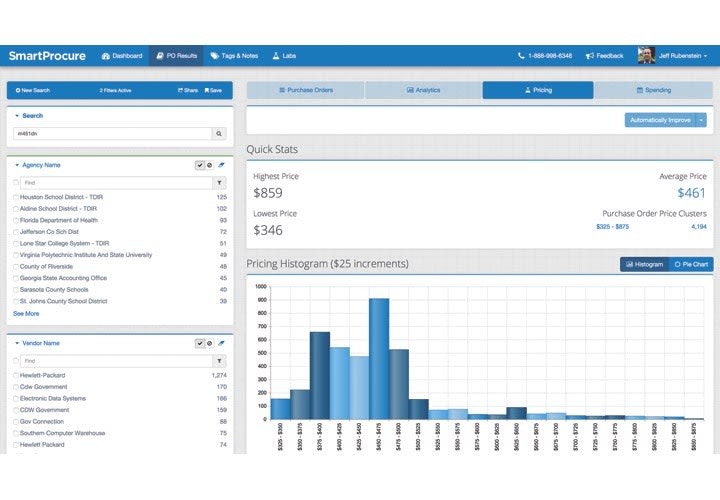
Image: SmartProcure
Working as an auxiliary officer for the Delray Beach (Fla.) Police Department, Jeff Rubenstein discovered that the city's Fire Department had purchased the exact same AEDs as the Police Department planned to buy, but for a much lower price. How could that be the case? Frustrated, Rubenstein set out to even the playing field for government agencies by allowing them to share information about their purchases. Now he is the founder and CEO of SmartProcure.
SmartProcure is an online database that allows members to login and search purchasing information from 7,000 local, state, and federal government agencies. Through the online Web portal users have access to 170 million purchase orders, including historical data going back to 2008.
"We made a very simple database as easy to use as Google," says Rubenstein. "You can type in an item, or a city, or a vendor, and you get an entire dossier of all of those purchases and find out who bought them at what price, when, and from whom."
As an example of how departments can use SmartProcure to save, a user can search the database and see that departments have bought the exact same popular printer for prices ranging from $350 to $850. Without this information to find the best available rates, two agencies or even divisions within the same large agency might easily pay vastly different amounts for the printer without realizing it.
You can also use SmartProcure not only to validate prices, but to find vendors. "Who have other departments been buying from, locally and nationally? What are they buying? It's great from a sourcing perspective," says Rubenstein.
For larger purchases, SmartProcure is also a great source for information needed to write requests for proposal (RFPs), which require a great deal of knowledge and research to write effectively. This is especially helpful if you haven't purchased an item recently and could use some guidance in what questions to even ask to determine parameters and specs, instead of starting from scratch. You can go into the database and see, for example, a list of 15 cities that have issued RFPs for the particular item you plan to purchase. "We provide contact info at each of those cities so you can contact your peer there to ask for info," says Rubenstein. "You can ask them if they wouldn't mind sharing the RFP they put together."
To help make the buying process easier for the next time you need to purchase any item, you can save searches as well as set up alerts in SmartProcure. If you often buy ammunition, for example, you can set up an alert for price changes. Then you'll be notified anytime an agency buys the specified product at a certain price or below a certain threshold.
Soon, a new feature will also allow agencies to request a quote from vendors directly through SmartProcure. Currently, you can search and find a vendor in the database, but you then have to log out of the system and make a phone call to the vendor. Then you need to provide details of what you want to buy and figure out how to contact a representative for your area.
"Agencies said they wanted to stay within the system and request a purchase order through it," says Rubenstein. "Now they can click a button, get a list of top vendors, ask for quotes, and automatically send it through to the vendor."
SmartProcure is currently free to agencies, as long as they provide their purchasing information to be shared in the database. SmartProcure then sells this data to vendors. Rubenstein says it takes just minutes to set up an account. You can even send your purchasing information as is, and SmartProcure will reformat it if needed. Then you can login and start reaping the benefits.
"We want to help government agencies be more effective purchasers so they can be more successful in what they do," says Rubenstein.
For more information, visit https://smartprocure.us/.
More Technology

A police agency's guide to data-driven fleet management
Costs are rising and the public expects more transparency into how their tax dollars are spent. This e-book shows how police agencies can use fleet data to take control of fleet expenses while improving officer safety and demonstrating fiscal responsibility to the communities they serve.
Read More →
AI and analytics for law enforcement: Turning data into insights
Law enforcement agencies are managing more video, sensor data and digital evidence than ever before. Discover how AI and analytics can help turn that data into actionable insights that strengthen situational awareness, accelerate investigations and support more informed decisions.
Read More →
Vasco Electronics Adds Automatic Language Detection to Vasco Translator Q1
Vasco Electronics’ software update introduces hands-free language switching and expanded offline translation across 45 language pairs, empowering law enforcement, healthcare, and front-office enterprise teams
Read More →
North Miami Police Department Deploys Mark43
The North Miami Police Department has deployed Mark43 as part of its Five-Year Strategic Plan that represents its collective vision and goals for a more proactive police department, anchored by a core commitment to leveraging modern technology to enhance efficiency and public safety.
Read More →
Cellebrite Genesis for Enterprise Now Generally Available
Made available to the public sector in June, Cellebrite Genesis is serving a growing mix of national, regional, and local agencies worldwide, including some of the largest regional and metropolitan police departments. It is now available for enterprise organizations.
Read More →
2026 Vision FirstNet Users Summit to Host Emerging Leaders Training on Grassroots Advocacy for Public Safety
“Emerging Leaders Training: Understanding the Importance of Grassroots Advocacy for Public Safety," a session during the 2026 Vision FirstNet Users Summit, will offer a roadmap for unified advocacy at the federal level.
Read More →
Motorola Solutions Completes Acquisition of D-Fend Solutions
Motorola Solutions has acquired D-Fend Solutions, an industry leader in counter-drone technology. This deal provides public safety and enterprise customers with access to advanced counter-unmanned aerial systems.
Read More →
ZeroEyes, Advantech & Camden Police Partner to Bring AI Gun Detection Technology to Delaware School District
ZeroEyes has partnered with Advantech and the Camden Police Department to deploy ZeroEyes’ AI gun detection and intelligent situational awareness platform at Delaware’s Caesar Rodney School District (CRSD).
Read More →
Leonardo U.S. Cyber & Security Solutions Introduces SignalTrace, the Next Evolution in Electronic Signature Detection Technology
SignalTrace reflects years of product refinement and a clearer expression of the technology’s purpose of recognizing and correlating electronic signatures in publicly broadcast wireless signals to reveal patterns, relationships, and trends that might otherwise go undetected.
Read More →
Pimloc Launches Secure File Sharing to Streamline Release of Redacted Video
Pimloc’s Secure File Sharing lets organizations deliver redacted video, audio, and documents through expiring, passcode-protected links, accelerating delivery while reducing security, compliance, and chain-of-custody risks.
Read More →